

OpenFOAM on Windows
For the latest version of our Windows patch for OpenFOAM visit "OpenFOAM 2.2.x on Windows".
OpenFOAM is a versatile open-source multi-physics simulation toolbox. It can simulate fluid flow (CFD), solid dynamics and electromagnetics (CEM). OpenFOAM was originally developed for Unix platforms, such as Linux, and until now there has not been a method for producing a native Windows version.
 OpenFOAM on Windows
OpenFOAM GUI
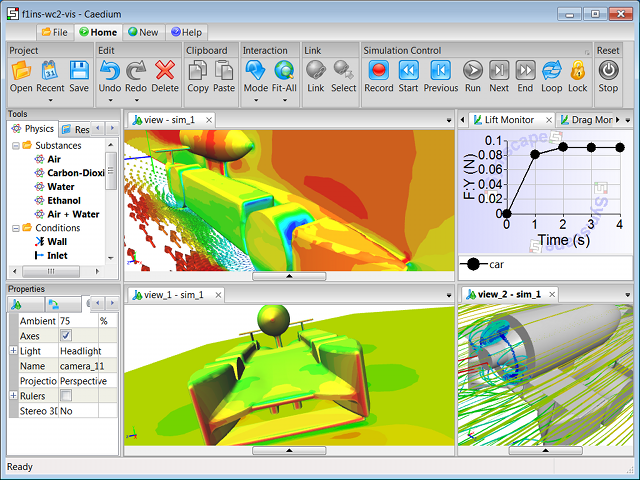
Are you looking for a GUI driven, integrated simulation environment for Windows, Linux, and Mac incorporating a selection of the RANS OpenFOAM solvers and various import/export filters?

Background
OpenFOAM is developed by OpenCFD Ltd., which is led by Henry Weller. The software and any derivatives (such as the work described here) are freely available under the GNU General Public License.
OpenFOAM Windows Port
There are a number of issues to address for a Windows version of OpenFOAM:
- OpenFOAM is dependent on a Unix build environment using tools such as bash scripts, make and flex.
- Some source filenames within OpenFOAM are identical except for upper and lower case differences (e.g., "vector.H", "Vector.H"). Windows does not, by default, differentiate between such names. Also, these names can clash with standard system filenames such as "vector.h".
- OpenFOAM makes system calls to Unix specific functions such as getenv.
- OpenFOAM has a cyclic dependency between its Pstream and OpenFOAM libraries.
Cygwin
One option to build and run OpenFOAM on Windows is to use Cygwin, which emulates a Linux environment for building and running Linux programs. To overcome filename clashes all names likely to clash must be changed.
While Cygwin is an option (as demonstrated by "The Unofficial OpenFOAM Cygwin Port" and "OpenFOAM extensions") for those that don't have access to a Linux computer, it comes with the overhead of slower runtime speed and is complex to configure.
Cross Compiler
A cross compiler allows compilation of source code on one computer-OS pair (such as Intel-Linux) that is destined to execute on another computer-OS pair (such as Intel-Windows). A Windows cross compiler (combining gcc and MinGW) running on Linux can use the OpenFOAM build environment with only minor modifications and requires no special treatment for the filename clashing issues.
By initially focusing on a serial (rather than parallel) version of OpenFOAM, the cyclic library dependency can be avoided by compiling the dummy Pstream files as part of the OpenFOAM library.
The remaining task is to provide the native Windows system calls to mimic the current native Unix system calls that OpenFOAM uses. Within the structure of the src/OpenFOAM library is the OSspecific directory that contains a Unix directory and is also where a new directory, MSwindows, will house the native Windows source code.
Once compiled the executables and libraries produced by a Windows cross compiler will not require any Linux emulation (such as Cygwin) and will run as fast as any other native Windows application.
A drawback of this cross compiler approach is the inability to build a new executable using the OpenFOAM libraries under Windows unless you are willing to enable the case sensitive file system option. Another option would be to combine the modifications described here with those in "The Unofficial OpenFOAM Cygwin Port" for a Windows build environment.
Patch Build Process
The following steps are required to produce a native Windows version of OpenFOAM 1.4.1 using a cross compiler:
- Configure, build, install and test a MinGW cross compiler for Windows running on Linux. I used the build-mingw script
- Add
#include_next <float.h>to the end of
"lib/gcc/mingw32/4.2.3/include/float.h" and remove it from
"mingw32/include/float.h" to include the right "float.h". - Install the OpenFOAM 1.4.1 source distribution on Linux.
- Remove all lnInclude directories using wcleanLnIncludeAll in the OpenFOAM installation directory. Thanks to Jason Dale for pointing out this problem.
- Remove the directory src/OpenFOAM/OSspecific - it has to be out of the OpenFOAM source tree completely. It will be recreated by the patch.
- Patch (using the Linux patch command) the OpenFOAM 1.4.1 source distribution with our MinGW Windows modifications [last updated April 3, 2008 to v5].
- Copy wmkdep and dirToString from wmake/rules/linuxGcc to wmake/rules/linuxmingw32.
- Modify and source the .OpenFOAM-1.4.1/bashrc-mingw32 script to match your OpenFOAM 1.4.1 source location.
- Build using Allwmake in the OpenFOAM-1.4.1 directory on Linux.
- Transfer the OpenFOAM executables (applications/bin/linuxmingw32DPOpt/*.exe) and libraries (lib/linuxmingw32DPOpt/*.dll) to the Windows computer.
- Launch a Windows command prompt to run OpenFOAM.
On the Windows computer ensure the following:
- The WM_PROJECT_DIR and WM_PROJECT_USER_DIR variables are set.
- The .OpenFOAM-1.4.1 directory from the original source distribution is within the WM_PROJECT_DIR.
- The PATH variable is set to include the OpenFOAM executable and library locations.
Constraints
With this method of building OpenFOAM for Windows the following features (there maybe more) are unavailable:
- job control scripts in bin (such as foamSolverSweeps)
- FoamX (the OpenFOAM pre-processor)
- parallel
The following libraries are unlikely to build:
- libccmio
- libcgns
- metis and any dependents
Tips
You may need to copy foamFlex++ from a Linux OpenFOAM build to the MinGW build (applications/bin/linuxmingw32DPOpt).
OpenFOAM is a registered trademark of OpenCFD and is unaffiliated with Symscape.
Feedback
Questions? Ideas? Problems?

Comments
Parallel OpenFOAM on Windows
The process described here is a workaround for the cyclic dependency between the Pstream and OpenFOAM libraries.
If you want to compile a parallel version of OpenFOAM for Windows then:
-lOpenFOAMwmake libso Pstream/dummy-L$(FOAM_LIBBIN)/dummy -lPstreamwmake libso OpenFOAMYou only have to perform this process once, after which libOpenFOAM.dll will depend on libPstream.dll. You can then compile other libPstream.dll libraries, such as mpi. Ensure the parallel library you wish to use is in your executable path on Windows.
OpenFOAM Windows Timing Comparisons
Here are results of an execution time (as reported by OpenFOAM) comparison between OpenFOAM running on the same dual boot computer.
Computer specifications were:
The case was the icoDyMFoam (movingCone) OpenFOAM tutorial.
(Ubuntu 7.10)
(v0.9.46)
Priority
Priority
Wine is a Windows emulator that runs under Linux.
Another Timing Comparison
Another timing comparison (suggested by Henry Weller) for a much larger 3D case using the same machine as previous.
The case was the Xoodles pitzDaily3D OpenFOAM tutorial, with the following modifications:
(Ubuntu 7.10)
(v0.9.46)
OpenFOAM Windows Patch v3 Available
Thanks to Bernhard Gschaider for pointing out some deficiencies in the OpenFOAM Windows patch and Henry Weller for suggesting a solution.
The latest patch (v3), in the build process above, now allows multiple platforms (e.g., MinGW and Linux) to build using the same source without having to start from scratch each time.
OpenFOAM Windows Patch v4 Available
Thanks again to Henry Weller for suggesting a better encapsulation of the OSspecific library.
The latest patch (v4), in the build process above, builds the OSspecific object collection which is then linked into the OpenFOAM shared library. This is a more flexible approach to allow the OSspecific library to vary across platforms.
The final compiled runtime libraries and executables from patches v3 and v4 will be identical, so if you've already compiled OpenFOAM using v3 then there's no need to compile again with v4.
OpenFOAM Windows Patch v5 Available
Thanks to Allen Zhao for pointing out that applying the previous patch (v4) didn't create needed empty Make/options files.
The latest patch (v5), in the build process above, now ensures, that when applied, the patch will create empty Make/options files. Also redundant linking to libOpenFOAM is removed when building executables.
The final compiled runtime libraries and executables from patches v4 and v5 will be identical. If you want to bring the previous patched build (v4) up to date with v5 then perform the following:
touch src/OSspecific/MSwindows/Make/optionstouch src/OSspecific/Unix/Make/options"divide by zero" FPE issue in MingW port
Hi,
This is Allen. I am running into a "floating divide by zero" issue on Windows. Following is what I posted on OpenFOAM message board. I am wondering if you know of a MingW compiler option that could be more tolerant to such error?
Best regards,
Allen Zhao
------------------------------------------------------
Hi, All,
I am running a modified version of OpenFOAM 1.4.1 cross-compiled with MingW compiler on Windows, and we have a runtime error like:
forrtl: error (73): floating divide by zero
On Windows (MingW port) his error will get triggered with or without FOAM_SIGFPE being set.
The same source code compiled with Linux/gcc can run when FOAM_SIGFPE is NOT set, but will crash in the same location when FOAM_SIGFPE is set in the env.
So obviously, this is an issue with the Foam::sigFpe::set() implementation.
Is there any special gcc switch used in the Linux compilation that allows more tolerance to division by zero?
Any suggestions?
Possible MinGW FPE Solution
Hi Allen,
Thanks for posting this problem. I think it is an issue with the MinGW compiler. I propose that we try an OpenFOAM source code modification rather than try to mod the MinGW compiler.
Try modifying src/OSspecific/MSwindows/signals/sigFpe.C as follows (let me know if this works):
void Foam::sigFpe::sigFpeHandler(int)
{
    if (env("FOAM_SIGFPE"))
    {
        const __p_sig_fn_t success = ::signal(SIGFPE, oldAction_);

        // Reset old handling
        if (SIG_ERR == success)
        {
            FatalErrorIn
            (
                "Foam::sigSegv::sigFpeHandler()"
            )   << "Cannot reset SIGFPE trapping"
                << abort(FatalError);
        }

        // Update jobInfo file
        jobInfo.signalEnd();

        error::printStack(Perr);

        clearFpe();

        // Throw signal (to old handler)
        ::raise(SIGFPE);
    }
    else
    {
        clearFpe();
    }
}


Foam::sigFpe::sigFpe()
{
    oldAction_ = SIG_DFL;
}


Foam::sigFpe::~sigFpe()
{
    clearFpe();

    // Reset signal
    const __p_sig_fn_t success = ::signal(SIGFPE, oldAction_);
    oldAction_ = SIG_DFL;

    if (SIG_ERR == success)
    {
        FatalErrorIn
        (
            "Foam::sigFpe::~sigFpe()"
        )   << "Cannot reset SIGFPE trapping"
            << abort(FatalError);
    }

    if (env("FOAM_SETNAN"))
    {
        WarningIn("Foam::sigFpe::~sigFpe()")
            << "FOAM_SETNAN not supported under MSwindows "
            << endl;
    }
}


void Foam::sigFpe::set()
{
    if (SIG_DFL != oldAction_)
    {
        FatalErrorIn
        (
            "Foam::sigFpe::set()"
        )   << "Cannot call sigFpe::set() more than once"
            << abort(FatalError);
    }

    // Install FPE by default because MinGW raises
    // FPE by default. Use env("FOAM_SIGFPE") in
    // signal handler to decide what to do.
    fpOld_ = _controlfp(0, 0);
    const unsigned int fpNew =
      fpOld_ & ~(_EM_ZERODIVIDE | _EM_INVALID | _EM_OVERFLOW);
    _controlfp(fpNew, _MCW_EM);

    oldAction_ = ::signal(SIGFPE, &Foam::sigFpe::sigFpeHandler);

    if (SIG_ERR == oldAction_)
    {
        oldAction_ = SIG_DFL;

        FatalErrorIn
        (
            "Foam::sigFpe::set()"
        )   << "Cannot set SIGFPE trapping"
            << abort(FatalError);
    }


    if (env("FOAM_SETNAN"))
    {
        WarningIn("Foam::sigFpe::set()")
            << "FOAM_SETNAN not supported under MSwindows "
            << endl;
    }
}
More OpenFOAM FPE
Hi Allen,
So I dug a little deeper and found that the original (and modified) implementation of src/OSspecific/MSwindows/signals/sigFpe.C works as you'd expect under Wine on Linux and Windows XP.
To generate a floating point exception I added the following to applications/solvers/incompressible/icoFoam/icoFoam.C:
int main(int argc, char *argv[])
{
.
.
.
  // FPE Test Begin
  float x = 10;

  for (int i = 0; 1 > i; ++i) {
    float result = x / i;
    Info << "FPE result = " << result << end;
  }
  // FPE Test End
.
.
.
  return (0);
}
I set the dos variable (set FOAM_SIGFPE=1) and the application stopped (without an error message - but that's another story). When I unset the dos variable (set FOAM_SIGFPE= ) the application worked fine reporting "FPE result = infinite"
I wonder if there's something affecting the FPE behavior within your environment?
These instructions seem to be
These instructions seem to be ok for someone who is expert with linux. Can some one please post same intructions explained step-by-step along with exact commands? It would be very helpful for people like mewho can barely run linux.